Managing rental properties means juggling tenant turnover, late-night lockouts, and the constant headache of tracking who has which key. Smart locks solve these problems by eliminating physical keys entirely, letting landlords and property managers control access remotely through codes or apps. They’re not just convenient, they’re a security upgrade that pays for itself after the first emergency locksmith call you avoid. This guide covers what makes a smart lock rental-ready, which models actually hold up in high-turnover units, and how to install and manage them without turning every lease change into a service call.
Table of Contents
ToggleKey Takeaways
- The best smart lock for rental property eliminates costly rekeying cycles by allowing landlords to issue temporary codes instead of managing physical keys, paying for itself in 1–2 turnovers.
- Look for rental-ready features including keyless/keypad operation, battery backup with low-battery alerts, retrofit compatibility, offline code generation, and auto-locking capabilities to avoid tenant-related issues.
- Top models like Yale Assure Lock 2 with Wi-Fi, August Wi-Fi Smart Lock, and Schlage Encode Plus offer durable construction, remote access management, and audit trails that protect both landlords and tenants.
- Proper installation requires checking door thickness, backset measurements, existing deadbolt type, and Wi-Fi signal strength before purchasing to ensure compatibility without permanent modifications.
- Smart locks reduce emergency lockout service calls, automate check-in for short-term rentals, and provide detailed access logs that resolve disputes—delivering ROI even faster when managing multiple turnover cycles annually.
Why Smart Locks Are Essential for Rental Properties
Rental properties face unique security challenges that traditional deadbolts can’t handle. Tenants lose keys, forget to return them, or hand out copies to friends and contractors. Each turnover requires rekeying or replacing locks, a time sink that costs $50–$150 per unit depending on your market.
Smart locks eliminate that cycle. They use temporary access codes instead of physical keys, so when a tenant moves out, the landlord simply deletes their code and issues a new one to the next renter. No locksmith needed.
Remote access is the other big win. If a tenant locks themselves out at 10 p.m., the property manager can issue a temporary code from their phone instead of driving across town with a spare key. For short-term rentals or Airbnbs, smart locks automate check-in entirely, letting guests enter via a time-limited code sent after booking.
Smart locks also create an audit trail. Most models log who entered and when, which helps resolve disputes about property access or maintenance visits. That transparency protects both landlords and tenants.
Key Features to Look for in a Rental Property Smart Lock
Not all smart locks are built for the wear and tear of rental units. Look for these features when shopping:
Keyless and keypad-based operation. Avoid models that rely solely on smartphone apps or biometric readers. Tenants change phones, forget passwords, and don’t always have tech-savvy guests. A physical keypad ensures anyone can unlock the door with a code, no app required.
Battery-powered with low-battery alerts. Hardwired smart locks require cutting into the door or frame, which isn’t practical for rentals. Battery-powered models install in minutes and send alerts when power runs low. Most use four AA batteries and last 6–12 months.
Retrofit compatibility. The best rental smart locks fit over the existing deadbolt without replacing the entire lockset. This matters because many lease agreements or HOA rules prohibit permanent door modifications. Retrofit models leave the exterior keyhole intact, so the door looks standard from the outside.
Offline code generation. Some smart locks require an active internet connection to issue new codes. That’s a problem if Wi-Fi goes down or the unit doesn’t have reliable connectivity. Choose a lock that can generate and store codes locally, with cloud sync as a backup.
Auto-locking capability. Tenants forget to lock doors. Auto-lock features engage the deadbolt after 30 seconds to two minutes, reducing the risk of unsecured entry. This is especially valuable for short-term rentals with high guest turnover.
Tamper alerts and backup access. Look for locks that notify the property manager if someone tries to force entry or removes the lock from the door. Most models also include a physical key override hidden behind the battery cover, so a dead battery won’t lock anyone out permanently.
Top Smart Lock Picks for Landlords and Property Managers
Here are the models that hold up best in rental environments, based on durability, ease of management, and tenant-proof design:
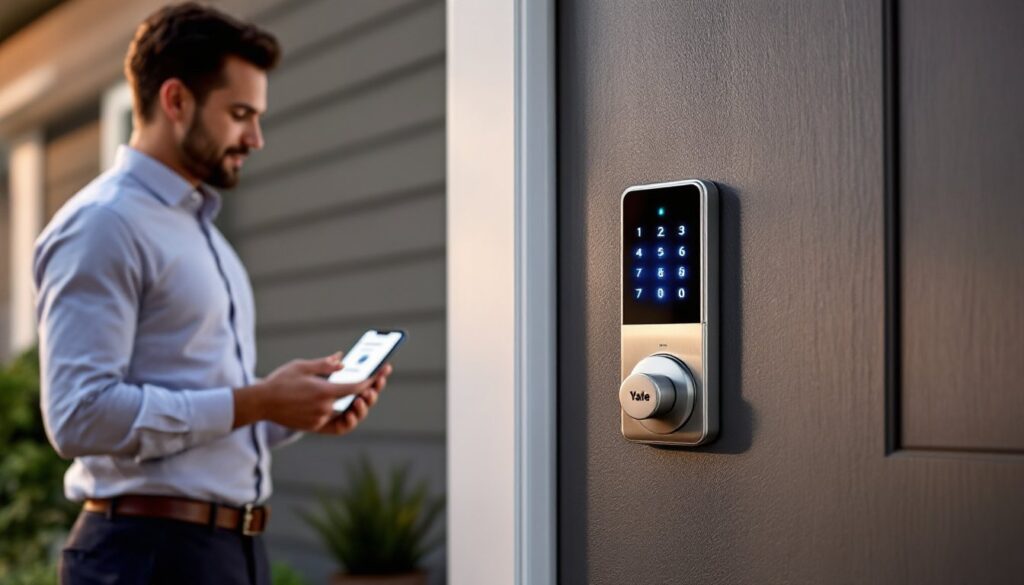
Yale Assure Lock 2 with Wi-Fi. This is the workhorse of rental smart locks. It’s fully keyless, operates via touchscreen keypad, and connects to Wi-Fi without needing a separate hub. The Yale Access app lets property managers create, schedule, and delete codes remotely. It supports up to 25 unique codes, which is plenty for multi-unit buildings or shared access for maintenance crews. The lock auto-locks after 30 seconds and sends alerts for low battery, forced entry, or tampering. It fits standard deadbolt prep (2-1/8″ bore), so installation is straightforward. Weather-resistant models are available for exterior doors.
August Wi-Fi Smart Lock (4th Gen). August’s retrofit design is ideal for rentals where landlords can’t or won’t replace the existing deadbolt. It mounts over the interior thumb-turn, leaving the outside keyhole untouched. Tenants can still use a physical key if needed, and the landlord controls access via the August app. It auto-locks, tracks entry history, and integrates with most property management software through APIs. The main downside: it doesn’t have a physical keypad, so access relies on smartphones or voice assistants like Alexa.
Wyze Lock. Budget-conscious landlords like Wyze for its low upfront cost (under $100) and no subscription fees. It’s another retrofit model that fits over the existing deadbolt. The Wyze app handles code management and access logs, and the lock integrates with Wyze’s ecosystem of affordable cameras and sensors. It doesn’t have built-in Wi-Fi, you’ll need the $20 Wyze Gateway to enable remote access, but it works offline for local code entry. Durability isn’t as proven as Yale or August, so it’s better suited for lower-turnover units.
Schlage Encode Plus. This lock offers built-in Wi-Fi, Apple Home Key support, and a backlit keypad that’s easy to use at night. It’s bulkier than Yale but just as durable, with a Grade 1 ANSI/BHMA certification (the highest residential security rating). It supports up to 100 access codes, making it overkill for single-family rentals but useful for larger buildings. The main trade-off: it’s pricier, typically $250–$300.
For those evaluating newer entrants, platforms like CNET regularly publish hands-on comparisons of connected home devices to help narrow down options.
Installation Considerations for Rental Units
Most smart locks install with a screwdriver and take 15–30 minutes per door. Here’s what to check before buying:
Door thickness and backset. Standard residential doors are 1-3/8″ to 1-3/4″ thick with a 2-3/8″ or 2-3/4″ backset (the distance from the door edge to the center of the bore hole). Measure before ordering, some locks don’t fit thicker or thinner doors without adapter kits.
Existing deadbolt compatibility. Retrofit models like the August or Switchbot Lock mount over the thumb-turn of a standard single-cylinder deadbolt. If the rental has a double-cylinder deadbolt (keyed on both sides), a mortise lock, or a multi-point lock system, you’ll need a full replacement model like the Yale Assure or Schlage Encode.
Door material and condition. Smart locks add weight to the interior side of the door. Hollow-core doors or doors with loose hinges may sag over time, causing the latch to misalign. If the door doesn’t latch smoothly before installation, fix that first, tighten hinge screws, plane the strike plate, or shim the frame as needed.
Power and connectivity. Battery-powered locks are the easiest install, but make sure the property manager or tenant can access the battery compartment without removing the entire lock. For Wi-Fi models, confirm the unit has reliable signal strength at the door. If the router is on the opposite side of the building, you may need a mesh extender or a model that works offline.
Permits and lease terms. In most jurisdictions, replacing a lock doesn’t require a permit. But, some lease agreements or condo associations restrict modifications to entry doors. If the rental is in a building with shared hallways, check whether exterior-facing smart locks are allowed. Retrofit models avoid most of these issues because they don’t alter the door’s appearance from the outside.
Managing Guest Access and Code Rotation
The biggest operational advantage of smart locks is access control. Here’s how to manage it without creating security gaps:
Issue unique codes for each tenant or guest. Never reuse the same code across multiple occupants. Unique codes let you track who enters and when, and they ensure that deleting one person’s access doesn’t affect anyone else.
Set expiration dates for temporary access. Most smart locks allow scheduled codes that activate and deactivate automatically. For short-term rentals, create a code that expires the morning after checkout. For contractors or cleaners, issue a code that works only during business hours on specific days.
Rotate codes at every turnover. When a tenant moves out, delete their code immediately, don’t wait until the new tenant moves in. If the lock supports it, also issue a one-time code for the final walkthrough, then delete it afterward.
Use master codes sparingly. Many locks let the property manager set a permanent master code for emergency access. Treat it like a physical master key: share it only with trusted staff, and change it if anyone with access leaves the team.
Monitor access logs regularly. Most smart lock apps store 30–90 days of entry history. Review logs weekly to catch unusual patterns, repeated late-night entries, access during posted vacancy periods, or failed code attempts that suggest someone’s trying to guess a combination.
For property managers handling multiple units, integration with property management software (like Buildium or AppFolio) can automate code issuance and deletion based on lease dates. Some smart locks also support integrations with platforms that track smart home automation, streamlining access across devices.
Cost vs. Value: Are Smart Locks Worth It for Rentals?
Smart locks cost $100–$300 per unit, plus installation labor if you’re not doing it yourself. Compare that to traditional lock replacement:
- Rekeying a deadbolt: $50–$75 per turnover
- Full lock replacement: $100–$150 including labor
- Emergency lockout service: $75–$200 depending on time of day
If a rental unit turns over twice a year, a landlord spends $100–$150 annually on rekeying alone. A smart lock pays for itself in 1–2 turnovers and eliminates most lockout calls.
For short-term rentals, the ROI is even faster. Automating check-in saves hours of coordination and reduces the need for a local keyholder. Some property managers report that smart locks reduce guest complaints about access issues by 60–70%.
Ongoing costs are minimal. Battery replacement runs $5–$10 per year. Most locks don’t require subscriptions, though premium features (like remote access via cellular backup or integration with third-party platforms) may cost $3–$10/month.
Resale and transferability add value too. If you sell the property, a smart lock is a selling point for tech-savvy buyers. If you move it to another rental, most models reinstall in minutes.
The main risk: tenant misuse. Some renters share codes with unauthorized guests or forget to close the door fully, leaving the auto-lock unable to engage. Clear lease language and a quick walkthrough at move-in reduce these issues.
Conclusion
Smart locks aren’t just a convenience upgrade, they’re a practical security and time-saving tool for landlords managing rental properties in 2026. Choose a model with offline code generation, retrofit compatibility, and auto-lock features to avoid the most common tenant and turnover headaches. Install it once, manage access remotely, and skip the locksmith bills.