Securing a hunting cabin, vacation property, or rural acreage isn’t like monitoring a suburban front porch. There’s no Wi-Fi router humming in the corner, no municipal power grid to tap into, and often no cellular signal for miles. Remote property owners face unique challenges: extended periods without human presence, wildlife interference, weather exposure, and the logistical headache of checking footage when you’re hours away. The right security camera setup can mean the difference between catching trespassers red-handed and discovering damage weeks after the fact. This guide walks through the essential features, camera types, and installation strategies that actually work when you’re off the grid.
Table of Contents
ToggleKey Takeaways
- Remote property security cameras must operate in extreme temperatures (-4°F to 122°F), feature IP66+ ratings for weatherproofing, and include local storage via microSD or NVR to function without reliable internet connectivity.
- Solar-powered systems with separate 5W+ panels and lithium iron phosphate batteries outperform integrated solutions in off-grid locations, especially in cold climates where standard lithium-ion capacity degrades significantly.
- Cellular trail cameras and LTE-enabled security cameras provide practical solutions for distant monitoring, though they require adequate signal strength testing and monthly data plan subscriptions ranging from $10–30 per camera.
- A tiered monitoring approach combining cellular trail cameras at property perimeters with higher-quality solar or wired cameras at buildings and high-value areas balances coverage and cost-effectiveness for remote properties.
- Proper installation involves mounting cameras 8–10 feet high, weatherproofing all connections with dielectric grease and silicone tape, optimizing solar panel placement for unobstructed south-facing exposure, and using security-grade hardware to prevent theft.
- Local storage and local recording capability are non-negotiable for remote properties, ensuring footage continues recording during connectivity outages and can be synced later when internet access returns.
Why Remote Properties Need Specialized Security Cameras
Standard home security cameras assume constant power, reliable broadband, and someone nearby to respond to alerts. Remote properties offer none of these luxuries.
Power infrastructure is the first hurdle. Most cabins and land parcels lack electrical outlets where you need surveillance coverage, gate entries, outbuildings, property perimeters. Running conduit hundreds of feet for a single camera isn’t practical or cost-effective.
Internet connectivity is equally problematic. Traditional Wi-Fi cameras depend on a router and modem, which require not only power but also a service provider willing to run lines to your location. Even if you have sporadic cellular service, standard cameras can’t leverage it.
Response time changes everything. In residential neighborhoods, a motion alert might bring police in minutes. On rural land, you could be hours away, and law enforcement response times stretch even longer. Cameras need to record locally and reliably, not just stream live footage you’ll never see in time.
Environmental factors hit harder without climate control. Temperature swings from below freezing to over 100°F, direct sun exposure, dust, and moisture destroy electronics designed for protected eaves. Wildlife, from bears to insects, will investigate, chew, or nest in poorly secured equipment.
These aren’t minor inconveniences you can work around with consumer-grade gear. They require purpose-built systems.
Essential Features to Look for in Remote Property Security Cameras
Not every camera marketed as “outdoor” or “wireless” will survive remote deployment. Focus on these specifications.
Operating temperature range should span at least -4°F to 122°F for four-season use. Check the specs sheet, not marketing copy, many “outdoor” cameras fail below 32°F. Look for cameras with internal heaters or thermal management if you’re in extreme climates.
IP rating of IP66 or higher ensures protection against dust and heavy rain. IP67 adds temporary water immersion protection (useful if mounting near ground level where flooding occurs). Lower ratings fail within months in exposed locations.
Local storage via microSD card (minimum 128GB) or NVR (network video recorder) is non-negotiable. Cloud-only cameras become useless when connectivity drops. Choose cameras that continue recording to local storage during outages and sync footage later.
Detection zones and sensitivity adjustments prevent thousands of false alerts from swaying branches, passing deer, or weather changes. Look for AI-based person/vehicle detection rather than simple motion sensing. This feature alone saves hours of reviewing useless footage.
Night vision range matters more than resolution. A 4K camera is worthless if it can’t see past 30 feet in darkness. Infrared illumination should reach 100+ feet for meaningful coverage. Some cameras use color night vision with built-in spotlights, but this drains battery on solar setups.
Battery capacity or power consumption directly impacts maintenance visits. If you’re using solar, look for cameras drawing under 5W during active recording. Batteries should hold at least 10,000mAh for multi-day operation without sun.
Power Options for Off-Grid Locations
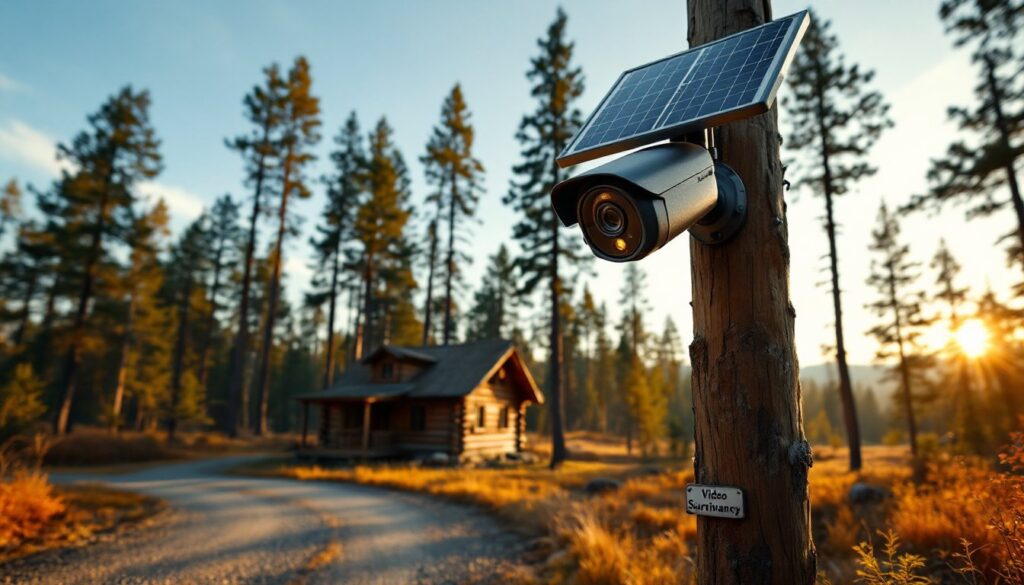
Solar-powered cameras dominate the remote property market, but not all implementations work equally well. Look for systems with separate solar panels (not integrated mini-panels) rated at least 5W. Panels should be adjustable to face true south (in the Northern Hemisphere) and tilted to match your latitude for year-round efficiency.
Battery chemistry affects cold weather performance. Lithium-ion batteries lose significant capacity below 32°F. Some manufacturers use lithium iron phosphate (LiFePO4) cells that function down to -4°F with minimal degradation.
12V DC wiring from a dedicated battery bank gives more reliable power than solar-direct cameras. A sealed lead-acid or LiFePO4 battery (50-100Ah) paired with a 50-100W solar panel and charge controller can run multiple cameras plus other equipment like gate controllers. This adds complexity but eliminates per-camera solar panel management.
Hardwired AC power might be feasible if you’re installing cameras near existing structures with electrical service. Use outdoor-rated cable (direct burial UF-B or conduit with THWN wire) and weatherproof junction boxes. Consult local electrical codes, some jurisdictions require licensed electricians for outdoor low-voltage runs over certain distances.
Connectivity Solutions Without Traditional Internet
Cellular cameras with built-in LTE modems transmit footage over mobile networks. They require a data plan (typically $10-30/month per camera) and adequate signal strength. Test signal at your property with your phone first, if you’re getting one or two bars, a camera might not maintain connection. External antennas can boost weak signals.
Cellular trail cameras designed for hunters offer a budget-friendly option. They send still images or short video clips when motion triggers detection. Companies like the ones featured in outdoor security camera reviews offer models with month-long battery life and low data usage.
Point-to-point wireless bridges work if you have internet access in one building and need to cover areas up to a mile away. A pair of directional antennas (like Ubiquiti NanoBeam) creates a wireless link. Line of sight is critical, trees and hills block signals. This approach works well for connecting an outbuilding to a main cabin with broadband.
SD card recording without any connectivity means manual retrieval. It’s low-tech but eliminates subscription fees and connectivity headaches. Use high-endurance microSD cards rated for continuous recording (not standard cards, which fail quickly). Check footage during routine property visits.
Top Security Camera Types for Remote Monitoring
Different camera designs suit different remote property scenarios.
Cellular trail cameras ($100-300) are the workhorse for basic monitoring. They’re battery-efficient, weatherproof, and purpose-built for remote use. Image quality typically maxes out at 1080p, and video clips are short (10-30 seconds) to conserve battery and data. Mounting is simple, strap to a tree or post. They excel at gate monitoring, trail watching, and general activity logging. Downsides: no live view on demand, delayed image transmission, and subscription costs.
Solar-powered Wi-Fi cameras ($150-400) offer better video quality and two-way audio but require cellular hotspot or wireless bridge for remote access. Brands like Reolink and Eufy make models with integrated solar panels and rechargeable batteries. These work well mounted on buildings where you have line-of-sight to a cellular hotspot in a main structure. Not suitable for areas without any internet access.
PTZ cameras with cellular connectivity ($400-800) provide pan-tilt-zoom control for covering large areas with a single device. Some models offer 360-degree rotation and 4x optical zoom. These make sense for monitoring large clearings, parking areas, or multiple outbuildings from one vantage point. They draw more power than fixed cameras, plan for larger solar panels or AC power.
Wired IP camera systems with NVR ($500-2000 for 4-8 cameras) deliver the most reliable performance if you have consistent power. Run Cat6 Ethernet cable (up to 328 feet per run without switches) from cameras to a central NVR. Power over Ethernet (PoE) simplifies installation by delivering power and data over one cable. This setup requires either grid power or a substantial off-grid system (generator or large solar bank). Best for property owners with existing electrical infrastructure.
License plate capture cameras ($300-600) use specialized sensors and lenses to capture plates at vehicle speeds. If your property has a single access road, one of these at the entrance creates a perfect accountability log. They typically require more configuration than general surveillance cameras but provide invaluable evidence if vehicles are involved in trespassing or theft.
For most remote property owners, a hybrid approach works best: cellular trail cameras at distant perimeters and property corners, with higher-quality solar or wired cameras at buildings and high-value areas. According to smart home security analysis, this tiered strategy balances coverage with manageable costs.
Installation Tips for Maximum Coverage and Reliability
Even the best camera fails if installed poorly. Follow these field-tested practices.
Height and angle affect both coverage and tampering resistance. Mount cameras 8-10 feet high, low enough to capture faces clearly, high enough to deter casual interference. Angle down 15-30 degrees to reduce sky in the frame (which causes exposure issues) and capture approaching subjects.
Test before permanent mounting. Set up cameras in temporary positions, review 24 hours of footage, and adjust placement based on actual conditions. You’ll discover blind spots, motion trigger issues, and lighting problems without drilling permanent holes.
Solar panel placement matters as much as camera position. Panels need unobstructed south-facing exposure (north-facing in Southern Hemisphere). Even partial shade from tree branches reduces output by 50% or more. Mount panels separately from cameras when possible, you can run 10-15 feet of cable to optimize each device’s position.
Weatherproofing cable connections prevents 90% of remote camera failures. Use dielectric grease on all connections, self-fusing silicone tape over threaded joints, and outdoor-rated cable glands where wires enter junction boxes. Water infiltration kills electronics slowly, you won’t notice until weeks later when the camera stops responding.
Cellular signal optimization often requires external antennas. Many cellular cameras have SMA or TS9 antenna ports. A magnetic-mount external antenna on a pole or building can turn one bar of signal into three, dramatically improving connectivity and battery life (weak signals force the modem to transmit at higher power, draining batteries faster).
Theft deterrence requires thinking like a thief. Security cameras are valuable and often in isolated locations. Use tamper-resistant screws (security Torx or one-way screws), metal security boxes, or cable locks. Mount high enough that a ladder is required. Some property owners use decoy cameras in obvious spots while hiding real cameras nearby.
Maintenance access should be considered upfront. You’ll need to clean lenses, check connections, and retrieve SD cards. Avoid mounting cameras where you need a tall ladder or have to wade through brush. A reachable installation with occasional maintenance beats an “optimal” position you can never service. For detailed comparisons of mounting strategies and long-term performance, resources like home security technology guides provide updated insights.
Signage isn’t just courtesy, in some states it’s legally required. Post clear “Video Surveillance” signs at property entrances. This also has practical value: visible signs deter casual trespassers who might otherwise not notice cameras.
Conclusion
Remote property security demands different tools and strategies than suburban home monitoring. Solar power, cellular connectivity, and weatherproof construction aren’t luxury features, they’re requirements. Start with entry points and high-value areas, test thoroughly before permanent installation, and build in redundancy where stakes are highest. The right camera system won’t just record incidents: it’ll give you genuine peace of mind when you’re miles away.